
Patient Intake Software for Occupational Therapists
Patients complete OT-appropriate intake on their phone — functional history, ADLs, goals, consents and insurance — so the first evaluation starts with usable data instead of paper.
Paper forms steal the evaluation.
Incomplete functional history, missing consents, and a clipboard in the waiting room mean the first hour is admin. Patients complete intake on any device; the answers land in the chart, ready for functional goals and assessment.
Occupational therapy intake, as the patient and therapist actually see it.
Each still is the live product: OT Patient Intake and Consent to Occupational Therapy on the client portal, then the same submissions on the therapist chart. The copy next to each image is what that screen is for.
Functional history before the first evaluation
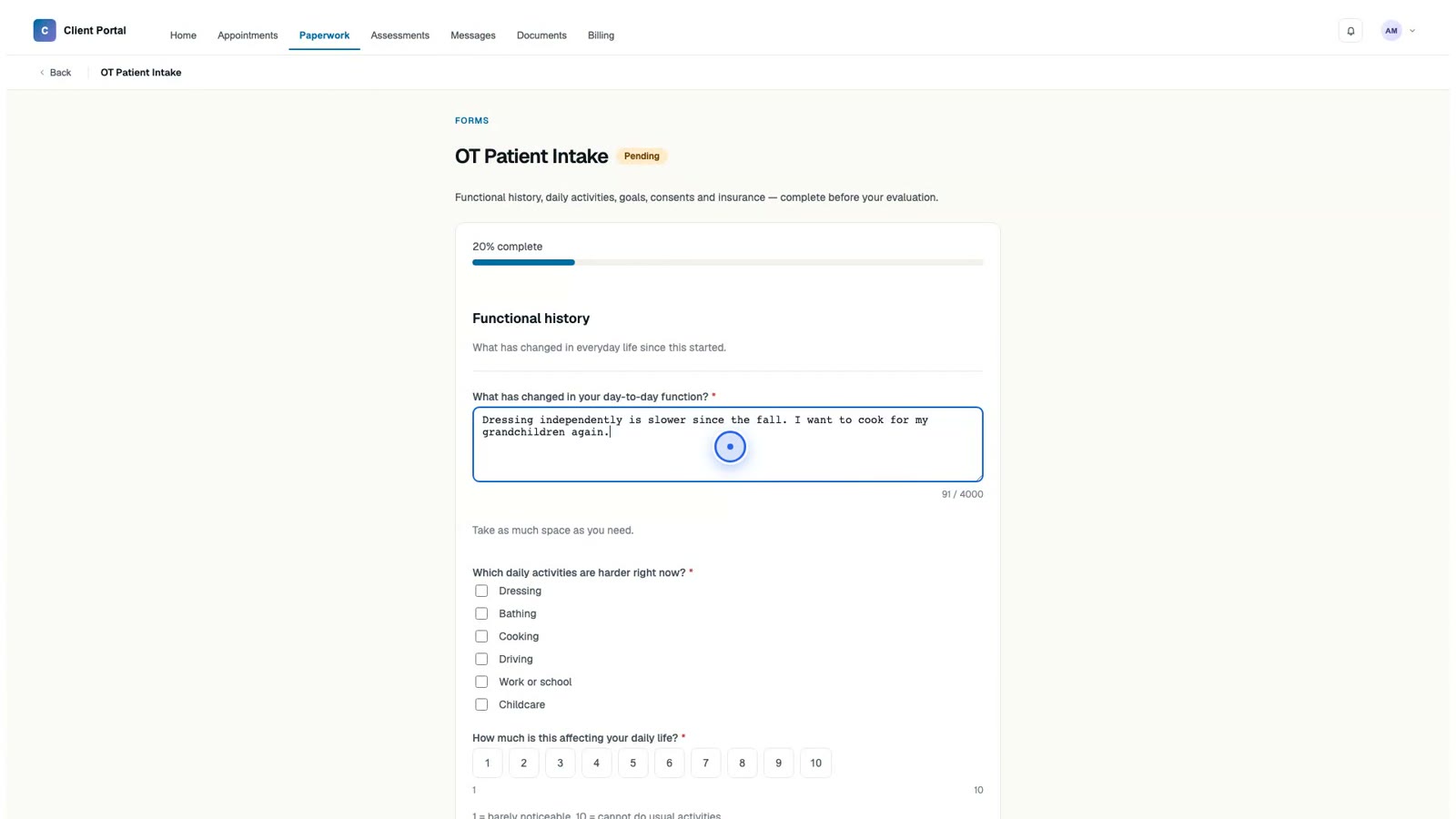
The OT Patient Intake form is practice-built content on Readya’s existing form engine — not a separate occupational-therapy product. A patient opens it on the client portal and starts with functional history: what has changed in day-to-day function, in their own words, with as much space as they need.
That long-text answer is what a clipboard in the waiting room usually compresses or skips. For occupational therapy it is the start of the record — dressing after a fall, cooking again, returning to work — captured before the visit, so the evaluation does not spend its first minutes on a blank history.
The same form continues into daily activities, an impact scale, goals, and an optional insurance-card upload. One assignment, one portal link, finished on a phone.
Which ADLs are harder — and what they want back
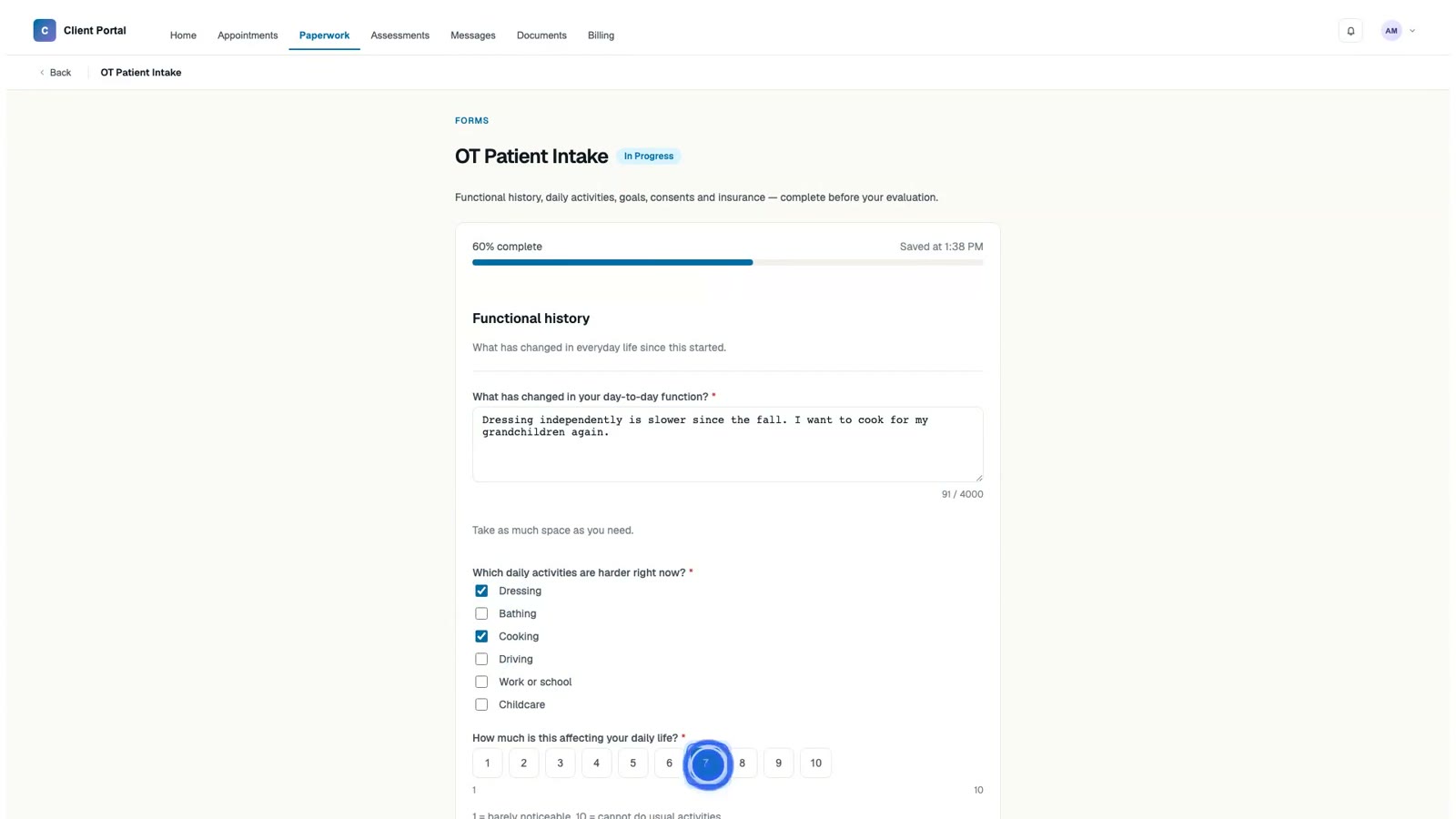
Occupational therapy intake has to name function. The form asks which daily activities are harder right now — dressing, bathing, cooking, driving, work or school, childcare — as a checkbox self-report, not a free-text afterthought.
A 1–10 scale follows: how much this is affecting daily life. Then a goals field: what would you like to be able to do again. Those three answers are the raw material for functional treatment plans and measurable objectives, not a generic “reason for visit.”
Insurance sits on the same template so the card can be uploaded before the first session. You can add sensory notes, hand-therapy history, or pediatric items with the same field types — scales, checkboxes, numeric, dates — without waiting on a dedicated OT module.
Informed consent, read and signed in the portal
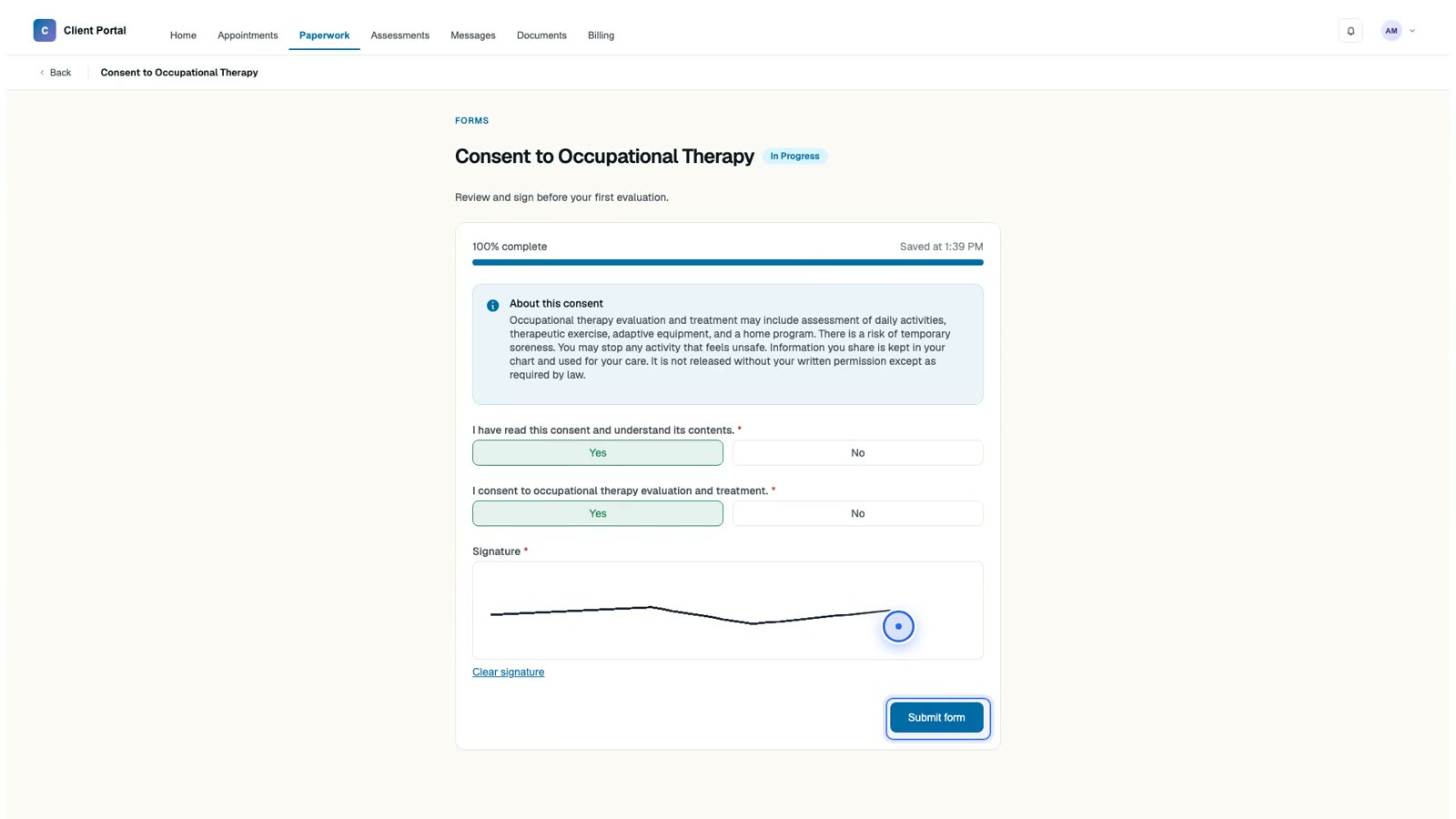
Consent to Occupational Therapy is a separate form in the consent category, so the portal treats it as a read-and-sign step rather than another intake questionnaire. The on-screen copy covers evaluation and treatment, the possibility of temporary soreness, the right to stop an activity that feels unsafe, and how information is kept in the chart.
Two required yes/no questions confirm the patient has read the consent and agrees to occupational therapy evaluation and treatment. An e-signature field captures the name on the same screen.
Nothing in this step is emailed as an attachment, printed for the lobby, or scanned back after the visit. Consent is PHI; it stays in the HIPAA-aligned portal, with a BAA available on every plan including Free.
Completed OT intake on the chart, not a stack of paper
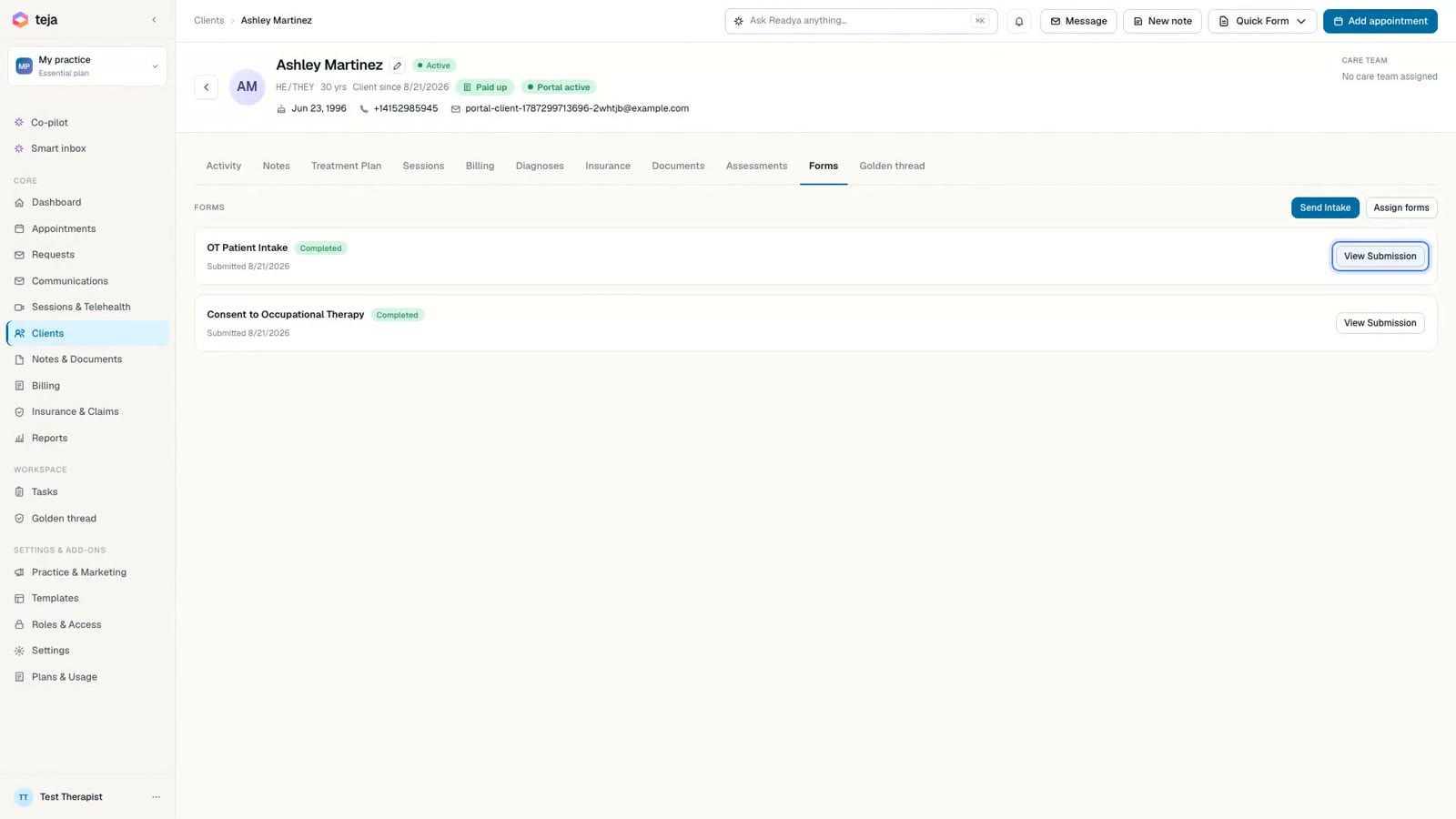
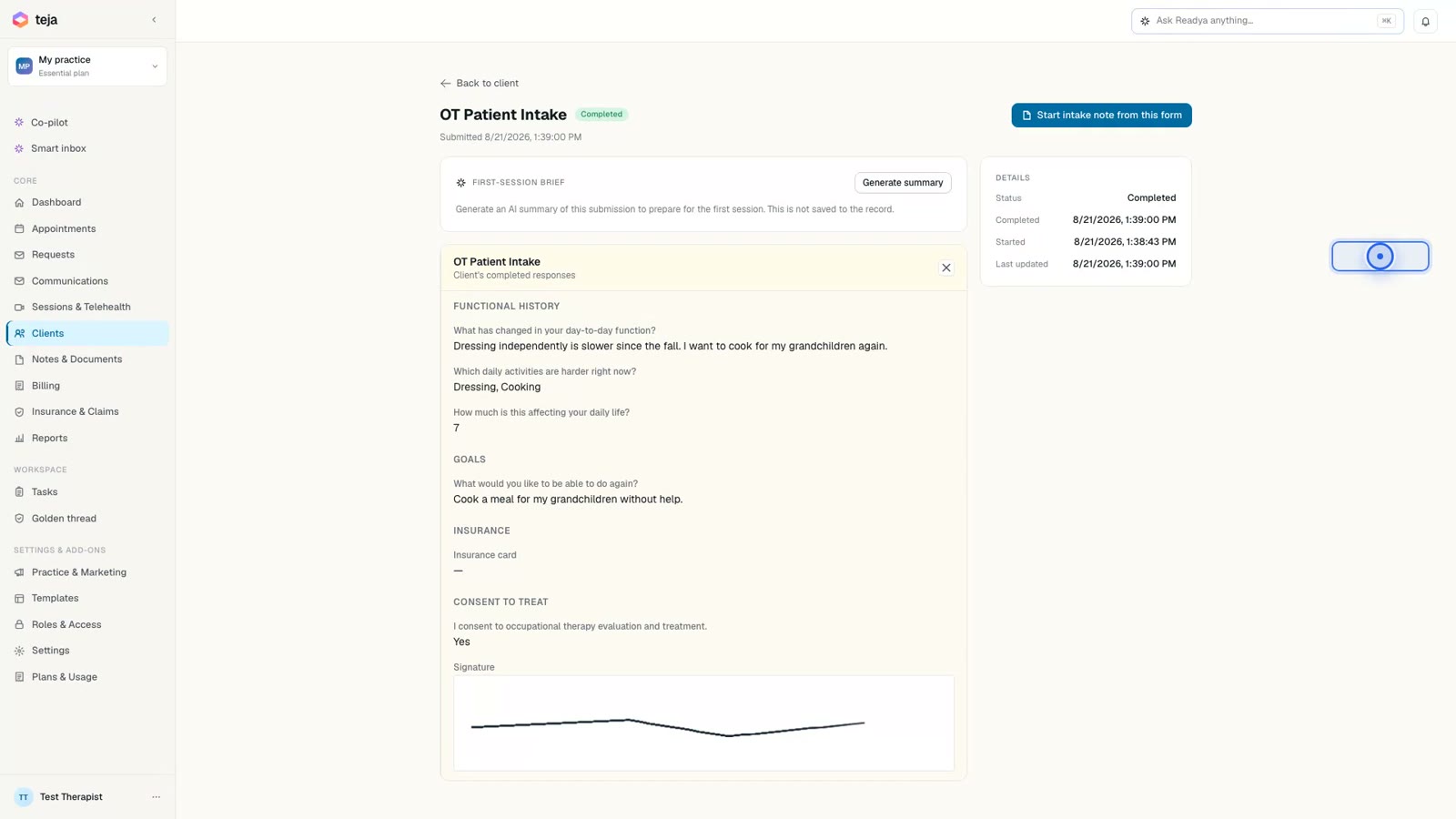
When the patient submits, the therapist does not re-key the packet. The chart lists OT Patient Intake and Consent to Occupational Therapy as completed forms on that client — already in the record when you open the evaluation.
That is the point of digital intake for occupational therapy: the first hour can start with assessment and goal-setting instead of a clipboard. How much of the hour that returns depends on how much you currently collect on paper; we do not invent a number.
From the chart you move into documentation, treatment plans, and scheduling on the same client. Intake is the first line of the record, not a side system.
Open the answers. Book the first session.
Opening a completed form shows the submitted answers in the chart: functional history in the patient’s words, the ADLs they checked, the impact score, goals, consent acknowledgments, and the signature. You read what they wrote; you do not transcribe it.
Those answers are what you write functional goals and measurable objectives from — dress with setup assist, stand at the counter for a short meal prep — and what progress notes continue over the course of care.
The next step in the same record is the calendar: the first evaluation on the week view, for that client. Intake, consent, chart, and scheduling share one thread instead of a portal, a PDF, and a paper chart.
Fill → sign → chart. Recorded from the live product.
Digital intake, then the rest of the practice.
Digital patient intake
Customizable forms with e-signature, finished on any device. Demographics, functional history, ADLs, sensory notes, goals, insurance and consents — before they walk in.
See intake →A white-label client portal
Booking, intake, messaging and telehealth on your own subdomain. It reads as an extension of your practice, not a vendor.
See the portal →The chart is ready when they arrive
Intake files to the client record automatically. You open the evaluation with usable data, not a stack of paper to re-key.
See documentation →Booking and reminders
Patients request a time; a branded intake link goes out automatically. Reminders chase the ones who have not finished.
See scheduling →Intake into the Golden Thread
Clean intake feeds treatment plans, progress notes and the clinical record over time — so function is visible across the arc of care.
See treatment plans →HIPAA-aligned from the start
Encryption in transit and at rest, access controls, and a BAA — including on the free plan. Built for PHI, not bolted on later.
See pricing →Book. Send. Complete. Chart.
Patient books
They request a time online, or you schedule them. One record starts.
Intake goes out
A branded portal link is sent automatically — consent, history and insurance included.
Completed on phone
Forms work in any modern browser. No app to install, no clipboard in the lobby.
Chart is ready
Answers are already in the chart, ready for functional goal setting.
Document change, not just sessions.
Intake is the first line of the record. Functional plans, progress notes and templates keep that line honest over time.
Functional treatment plans
Structured goals and measurable objectives with an extensible intervention library, tied to diagnoses.
See treatment plans →Across the whole course
Progress notes and a review cycle that show change over time, with version history and discharge summaries to close the loop.
See documentation →Built to your assessments
Compose custom templates from the field types your functional assessments use — scales, checkboxes, numeric, dates.
See templates →Where the platform meets your specialty.
Readya was built first for behavioral-health therapy. Its functional treatment plans, longitudinal progress tracking and customizable templates adapt to OT work — but there isn't a dedicated OT module today. If a functional-assessment specific to your practice matters, tell us; we build toward the practices that ask.
Treatment plan · from intake
chart readyOT intake, answered.
What should an OT patient intake form include?
Most occupational therapy practices collect demographics, referral source, a functional history, ADLs, current goals, consents and insurance before the first evaluation. Readya’s intake is customizable, so the form can match what your setting actually needs — sensory notes, hand-therapy history, pediatric milestones — instead of a generic clipboard.
Can intake forms be customized for sensory, hand therapy, or pediatrics?
Yes. Compose templates from the field types your assessments use — scales, checkboxes, numeric fields, dates and free text. There isn’t a dedicated OT module today; the same template builder is what adapts intake to sensory work, hand therapy or pediatrics.
Is the intake HIPAA compliant?
Intake runs in a HIPAA-aligned portal, with encryption in transit and at rest. A BAA is available on every plan, including Free. Clients complete forms in the browser — no personal email attachments, no paper in the waiting room.
Does intake data flow into the clinical record and treatment plan?
Yes. Completed forms file to the client record automatically. You can set functional goals and measurable objectives from that history instead of re-typing it, and progress notes continue the same thread.
How much time does digital intake save on the first visit?
We don’t invent a number. What changes is when the paperwork happens: patients complete it before they arrive, so the evaluation can start with assessment and goal setting instead of a clipboard. How much of the hour that returns depends on how much you currently collect on paper.

Start the evaluation with the data, not the clipboard.
Stand up digital intake and a branded portal. The first three clients are on us.